Orbit Language Learning
LLM INTEGRATIONS
LATENCY OPTIMIZATION
CONVERSATIONAL UX
EMBEDDED AI SYSTEMS
LANGUAGE LEARNING
Roles & Responsibilities
UX/UI Design: Research and Design
Development: Testing, Building and Coding in AI Assisted IDEs
Project Context
Responsible for all design, testing, development, and production
Quarter 2 (2026)
Independent Project
Tools Used
Claude Code
Google AntiGravity
GPT 4.0 Mini
Gemini
Figma
Orbit is a language learning system built directly into WhatsApp that combines real time translation, AI assistance, and contextual learning. Users can communicate naturally while turning everyday conversations into learning opportunities.

CONTEXT
An estimated 4.4–5.5 million Americans live abroad, according to Federal Voting Assistance Program and American Citizens Abroad. Many depend on WhatsApp as their primary communication tool. Interviews with 10 non-fluent expats revealed consistent friction in everyday messaging.
Key Frictions
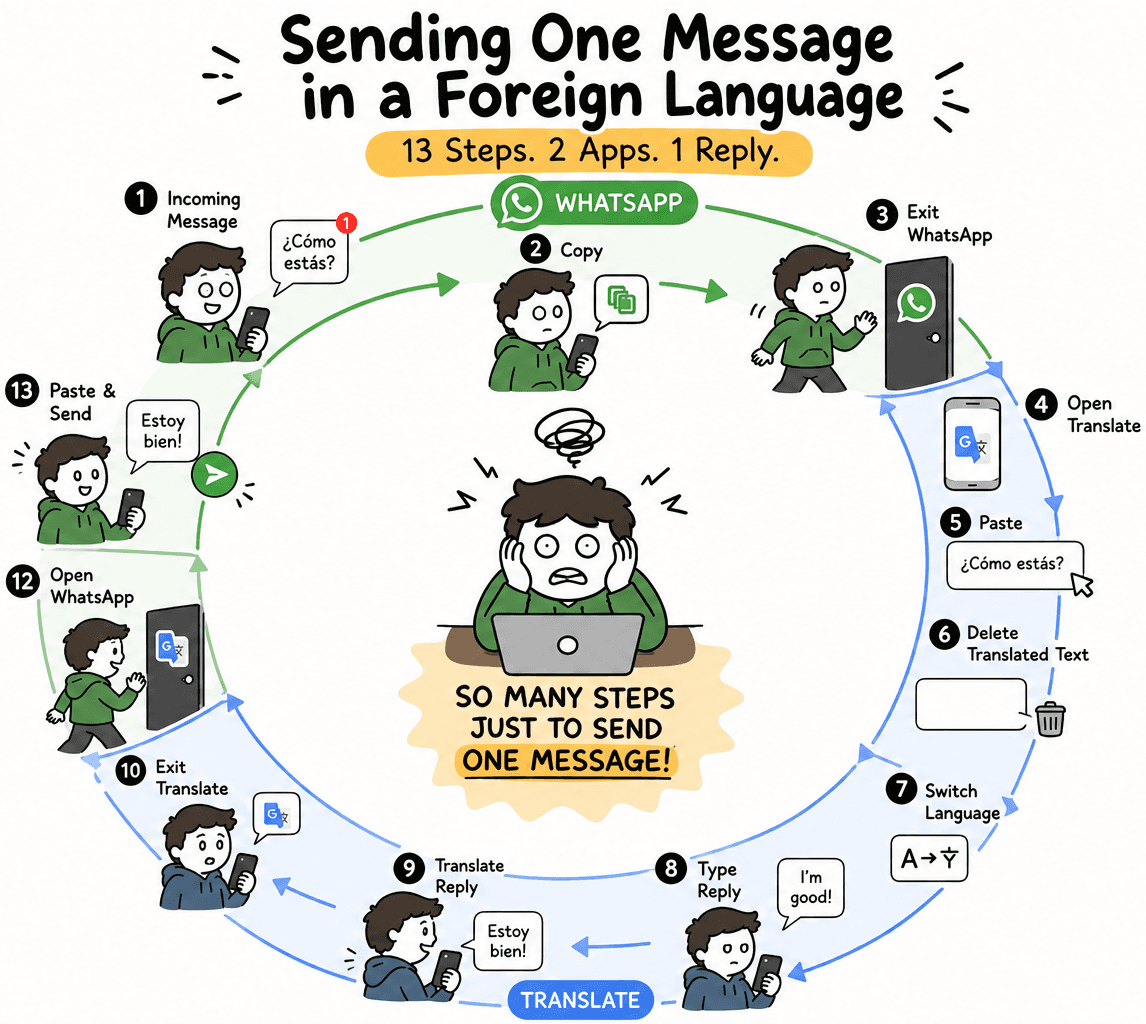
Fragmented Workflow — Sending a single message with translation required switching between multiple apps and up to 13 steps
Lack of Natural Tone — Translations often felt robotic and missed cultural nuance
Missed Learning Opportunity — Tools helped send messages, but didn’t help users actually learn the language
THE SOLUTION
Build into the conversation. Not beside it
Design a messaging experience that lives directly within WhatsApp, eliminating friction while turning everyday communication into a learning opportunity.
The solution focused on three core outcomes:
Outcomes
Streamlined Communication — Reduce the messaging process from a multi-step, multi-app workflow to a seamless interaction
Lack of Natural Tone — Generate messages that reflect real conversational tone and cultural nuance, not textbook phrasing
Missed Learning Opportunity — Support passive language acquisition by helping users understand and internalize translations as they communicate
By embedding translation, tone adaptation, and learning support directly into the messaging flow, the product transforms translation from a workaround into a tool for fluency.
INITIAL VISION
The initial concept was simple: bring translation and learning directly into the act of typing.
I started out drafting simple wireframes of a keyboard-centered experience designed to keep users in flow while communicating and learning at the same time.
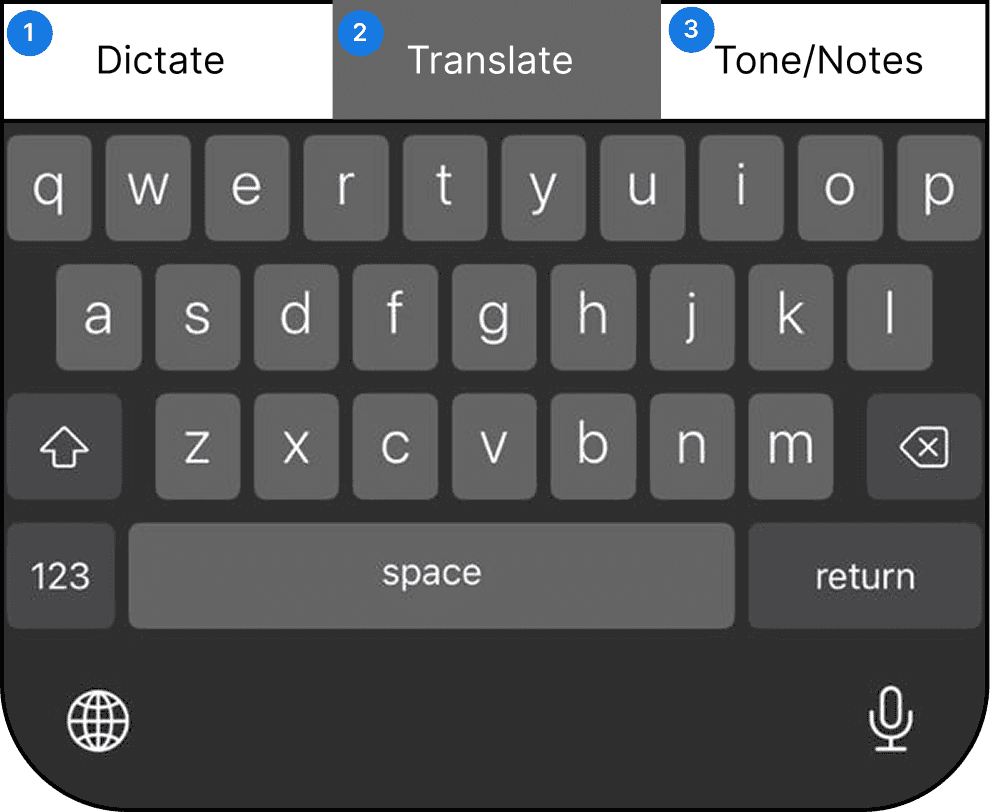
Keyboard Prototype
Dictatation Button - Speak naturally in your native or target language and have your message translated directly into the text field
Translate Button - Convert messages with a single tap and send them directly to WhatsApp without leaving the conversation
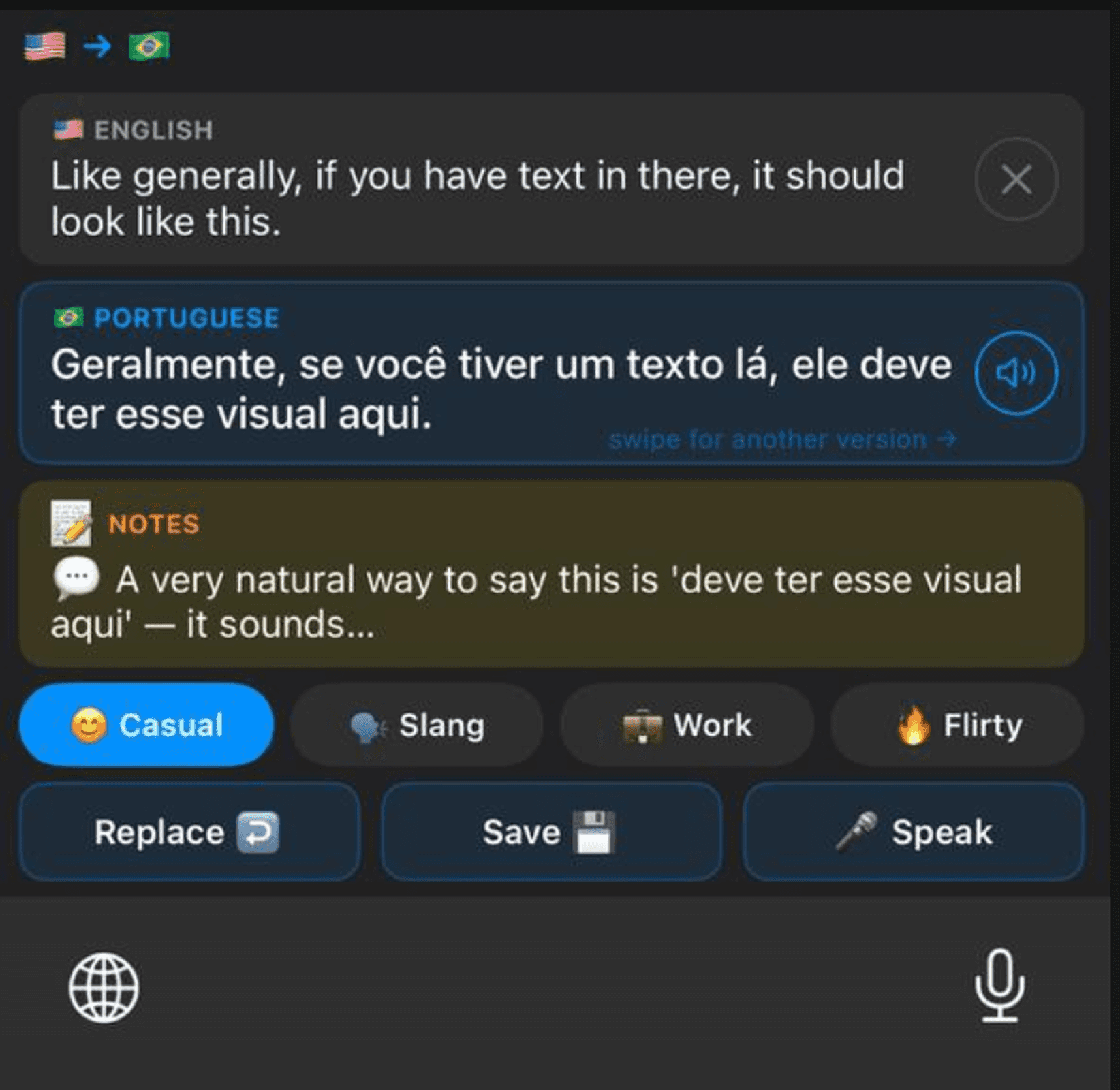
Tone/Notes - Tailor translations to different tones while learning the meaning behind regional expressions, slang, and everyday phrasing
DISCOVERY
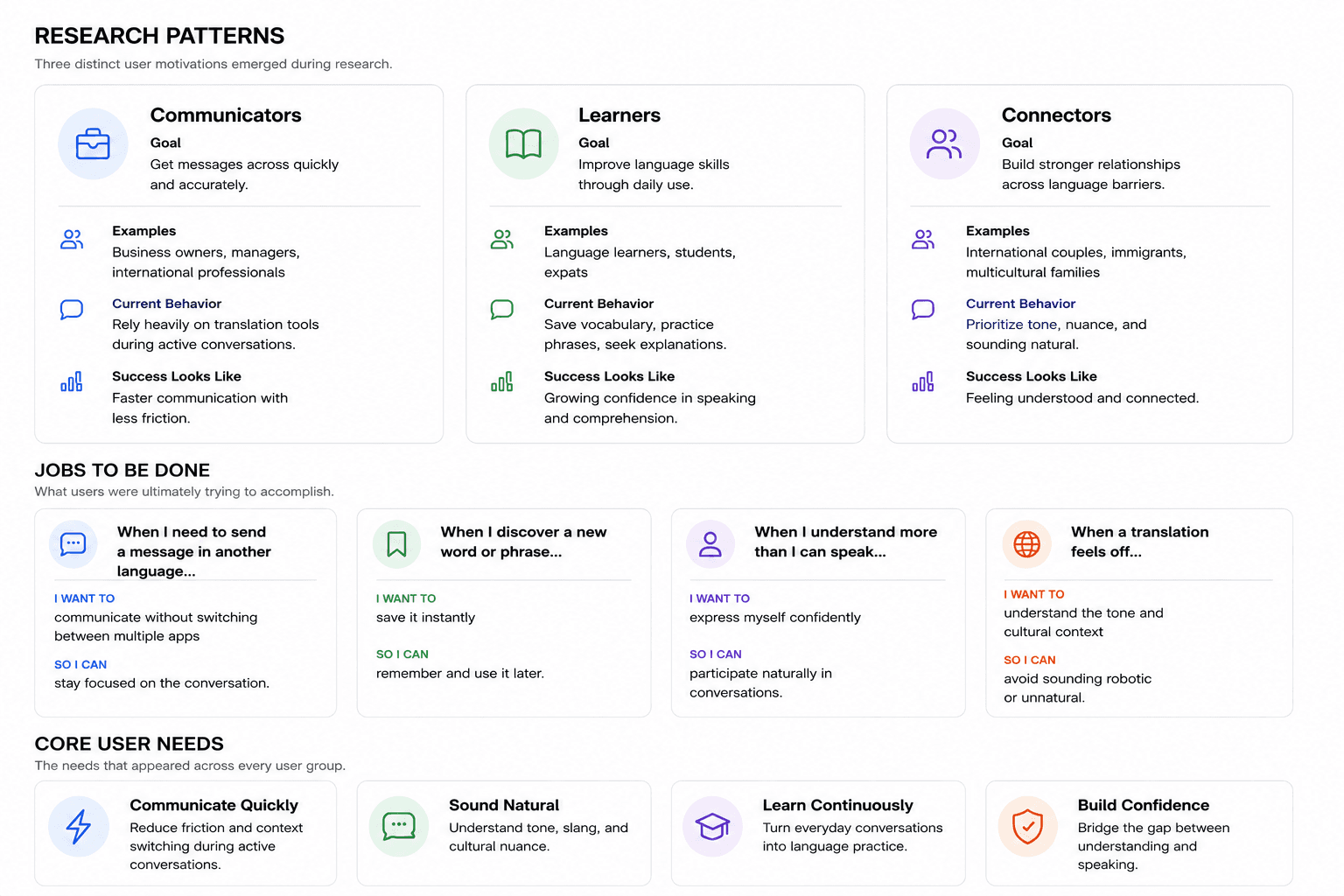
Interviews with 10 expats who had lived abroad for 6+ months revealed a clear pattern: while structured study played a role, most real progress came from everyday interactions.
Because those interactions already happen in WhatsApp, the opportunity became clear: embed translation directly into the messaging experience, allowing users to communicate instantly while capturing new words and phrases, understanding their context, and reinforcing them through repeated exposure over time.

LEARNING OPPORTUNITY
I actually started with the right idea.
My vision from the beginning was for users to type and translate within a single keyboard. When the model I was working with concluded that a custom keyboard couldn't be integrated into a third party app, I accepted the limitation as fact.
The workaround technically functioned, but it forced users to type, copy, switch keyboards, and paste before they could send a message.
Eventually, I revisited the assumption and discovered it was incorrect. It wasn't the constraint was real; it was simply unchallenged.
The experience taught me that AI is a powerful collaborator, but not an authority. Good product decisions still require independent thinking, validation, and a willingness to question assumptions.
CULTURAL NUANCE
A recurring challenge was that what users learned in class often didn’t reflect how language is used in everyday life.
The system addresses this by going beyond direct translation. It adapts tone, explains phrasing, and highlights expressions that don’t translate cleanly but are common in real conversation.
Users could tap words to translate them instantly, save new vocabulary, and explore suggested phrases and slang in context.
ANTICIPATING INTENT
Translating incoming messages was a feature I knew the product needed.
The first solution worked, but it required users to copy a message, switch contexts, and manually trigger the translation. It was functional, but far from seamless. Add to that, iOS keyboard limitations exposed additional friction in the experience. Rather than patching around the problem, I stepped back and reconsidered the workflow entirely.
Inspired by products that proactively anticipate user intent, I realized a much simpler solution: translation could begin the moment a user copied a message.
What started as a multi-step process became a nearly effortless experience.
SPEAK FREELY
Research revealed a common pattern among learners: people often understand more than they can speak.
That gap can be frustrating. Users know what they want to say but struggle to produce it in the moment.
Voice translation helped close that gap by allowing users to speak naturally and receive an instant enhanced correction written naturally in their target learning language. The feature encouraged active language use while removing some of the pressure that often prevents learners from participating in conversations.
As a bonus, it's bi-lingual and the fastest option to send messages if you use your native language.
Note: iOS does not allow audio recording directly within third party keyboards, requiring users to temporarily leave the keyboard experience. Rather than treating this as a limitation, I used Orbit's visual language, gradients, and animations to create a transition that felt intentional and seamless.

SMART TRANSLATION
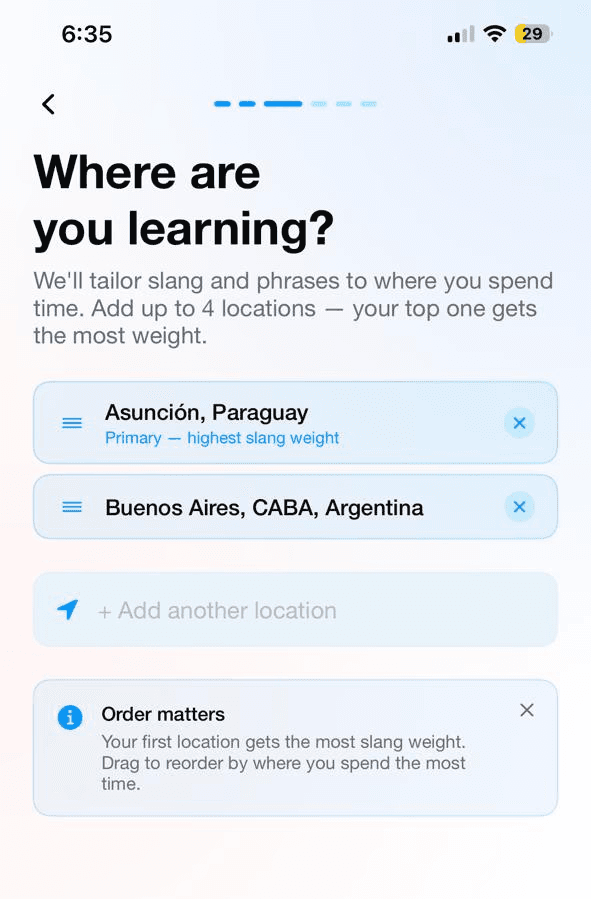
Language shifts depending on where you are. In widely spoken languages like Spanish, the same idea can be expressed very differently across regions.
During onboarding, users selected up to three locations. This allowed translations to align with the dialects they were most likely to encounter, making communication feel more natural in context.
ENGAGEMENT & MEMORY RETENTION
When I spoke with language learners, I noticed a recurring pattern. New words and phrases were being captured everywhere: notes apps, screenshots, text messages, notebooks, sticky notes, and sometimes nowhere at all.
The problem wasn’t discovering new vocabulary. It was keeping track of it.
The companion app became a single place to collect, organize, and revisit everything users learned throughout the day. Learners could save new words, organize them into custom decks, and review them using spaced repetition.
To reinforce consistency, the app also introduced lightweight progress tracking, helping users see how many words they retained, how often they practiced, and how their vocabulary grew over time.
CONVERSATIONAL AI
Building a personalized conversation engine
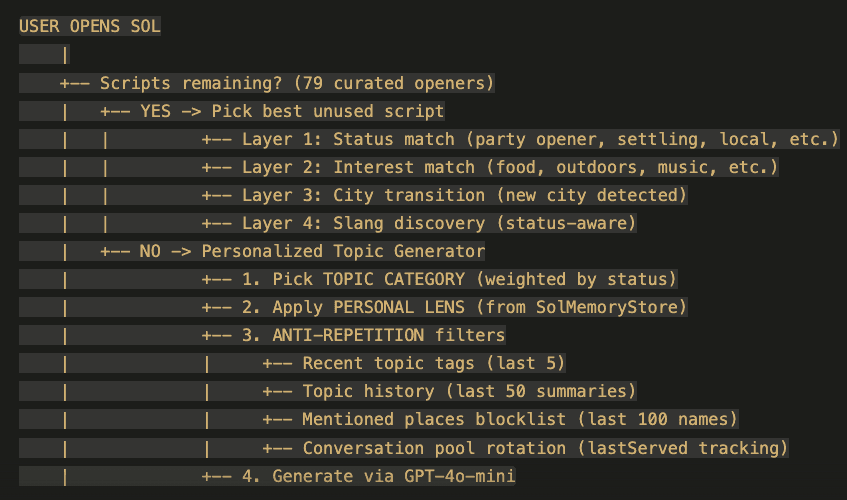
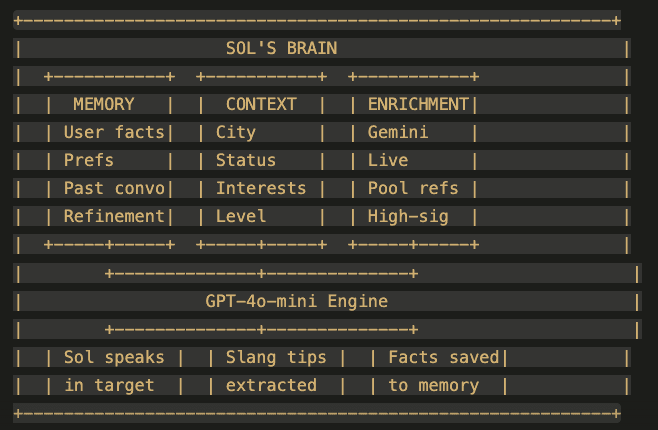
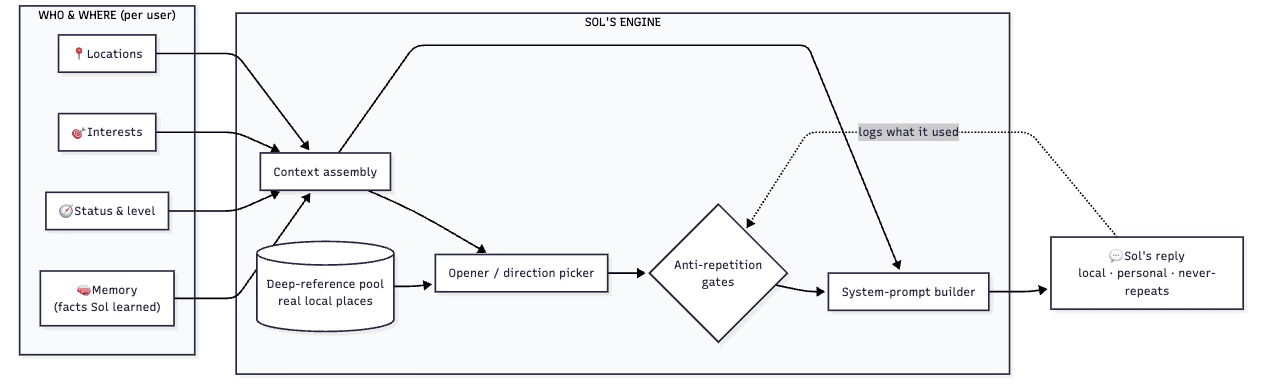
When I built our in-app AI conversational agent Sol, personalization was a core part of the product experience. During onboarding, users shared information about their interests and location, giving Sol the context needed to create more engaging conversations. Rather than starting every interaction from the same template, the system could introduce projects and topics tailored to each person’s background and interests.
The real challenge emerged over time. As users returned to the product, conversations risked becoming repetitive and predictable. To solve this, I designed a memory framework that allowed the models to database the recency of subjects discussed and control them on a rotation to avoid redundancy or seem boring. In addition, unique IDs were assigned to specific attributes (attractions, city sites, news, historical events, etc) that we ran across each emerging conversation. This created a more dynamic experience that felt less like interacting with a scripted system and more like an ongoing conversation.
Two models in tandem
Orbit's Conversation Partner Sol uses a combination of ChatGPT mini to create localized language paired with Google's native Gemini (which is great at searching) to create suggestions triggered by the user's unique interest and desired learning location.


Designing for diversity in every conversation
Sol uses a number of different variables including subject recency, location, interests, and cultural commentary to determine the opening of each new conversation

AI ASSISTED CHAT
Invisible teaching
A core design principle was treating the chat like a real conversation rather than a traditional learning tool. Users needed help understanding unfamiliar words, cultural nuances, and alternative phrasing, but those moments of learning couldn't come at the expense of conversational flow.
I designed a gesture-based system that made learning resources available exactly when users needed them. Audio playback, translations, definitions, and phrase-saving tools were all accessible directly from individual messages, allowing users to learn naturally as the conversation unfolded.
iOs Interactions
Single Tap — Message Playback
Double Tap — Slide message to see translation (target language or refined translation)
Long Press — Open message to learn / save new vocab to your clipboard
FINAL THOUGHTS
What started as a fun experiment with emerging AI tools quickly became an exercise in making complex functionality feel simple, lightweight, and intuitive. As the product evolved, so did my understanding of the problem space.
Putting the product in front of real users proved invaluable. Early testing surfaced several opportunities for improvement:
Key Findings
Onboarding tooltips were often overlooked and needed to remain visible until users completed the associated action
Keyboard auto-correct could be improved by toggling the chosen language to write in
Incoming audio translation audio capabilities were a missed opportunity that we added
These insights reinforced the value of shipping early and learning from real-world usage. While there is still plenty to improve, my goal is to launch the product on the App Store and continue refining it through observation, feedback, and iteration.